How to Build an Android Chat Application in Kotlin
In this step-by-step tutorial we'll build a real-time Android chat application in Kotlin. This guide reuses the full source code from our premium Android Chat App.
How to Build an Android Chat Application in Kotlin
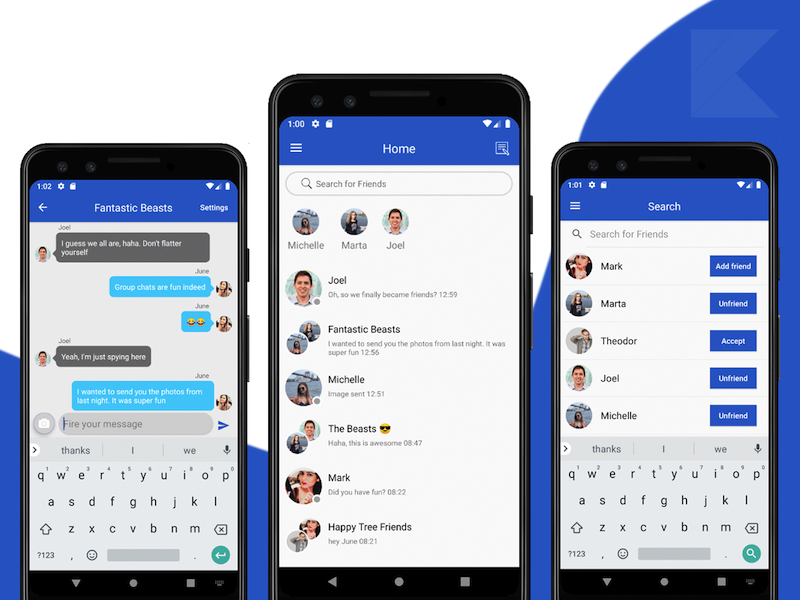
To build a fully-fledged Android chat application you should include these core features:
- Real-time Messaging
- Photo Messaging
- Private Messaging
- Group Chatting
- Push Notifications
- Messages Archive
- Online Status
We leverage Firebase as the backend. More specifically we use:
- Firebase Auth — user management (Login, Registration, Facebook Login, Google Login, etc.)
- Firebase Firestore — real-time database for users and messages
- Firebase Storage — stores photos and videos sent from the app
- Firebase Cloud Messaging — sends real-time push notifications to message recipients
High-level steps to get started:
- Open & Run the Kotlin project in Android Studio
- Override
google-services.jsonwith your own file (downloaded from Firebase Console). This will wire the chat application to your Firebase project. Enable Firebase Auth providers and Firebase Storage; for Firestore, set read/write rules appropriately during development. - Publish the app to Google Play Store
It looks straightforward — we'll walk through these milestones and also cover enabling push notifications.
Enable Push Notifications
To send real-time push notifications you need the correct Server Key from Firebase Console.
Go to Firebase Console → Your Project → Project Settings → Cloud Messaging and copy the Server Key (Authorization key). It looks like this:
AAAAeliTfEs:APA91bGve5fyExjSiUCB0oI09Br1yGUSb0tPHelAk7L0FUytHWGOMlBPexJubTwSjjJTaIlK7oto3jDevoj9c5Q4Qalk6QEtQ9Y3tYfTxHD7OrmPZuVJjVGGciPBJXThG9QHCZQqx9Id
In Android Studio open AppConstants.kt (usually under the Utils folder) and replace the SERVER_KEY field with your authorization token.
Re-run the project and send some messages to verify push notifications are delivered.
Looking for a custom mobile application?
Our team of expert mobile developers can help you build a custom mobile app that meets your specific needs.
Get in Touch